



Mastering Custom Laser Design for Unique Creations
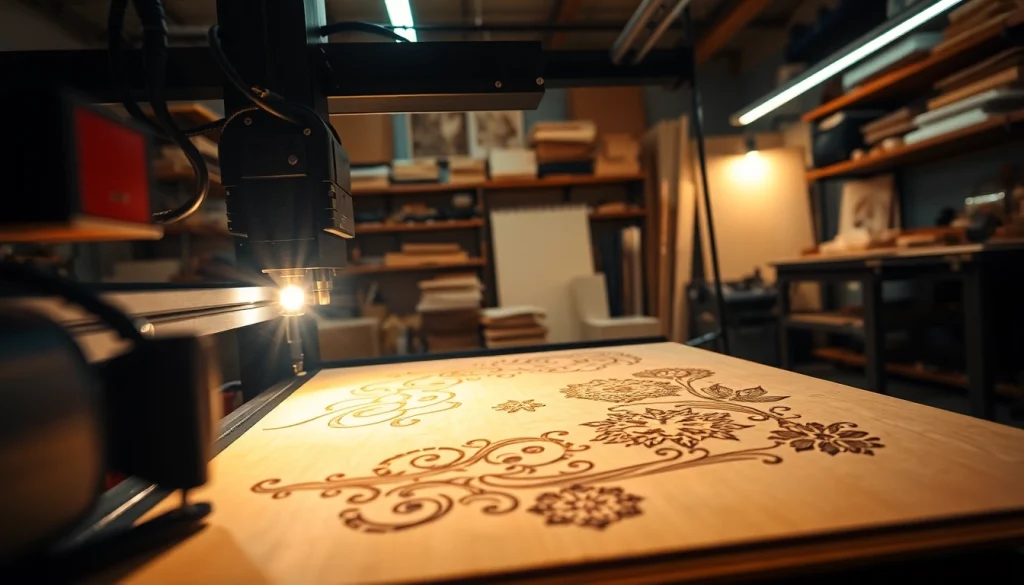
Table of Contents
Understanding Custom Laser Design
What is Custom Laser Design?
Custom laser design is a cutting-edge technique that involves using a laser cutting or engraving machine to create intricate designs on various materials. This technology allows for precision and creativity, making it ideal for both commercial and personal projects. The process utilizes high-powered lasers that can precisely cut through materials such as wood, acrylic, metal, and fabric, or engrave detailed patterns on surfaces. The result is stunningly unique products that perfectly match individual specifications. For anyone looking to explore their creative potential, custom laser design offers limitless possibilities.
Applications of Custom Laser Design
Custom laser design serves a multitude of industries and applications, including:
- Signage: Creating customized signage for businesses or events with precise lettering and design.
- Home Décor: Personalized items such as wall art, photo frames, and decorative objects can be produced.
- Jewelry: Crafting intricate patterns and unique shapes for personalized jewelry pieces.
- Promotional Products: Engraving company logos and designs on various items for marketing purposes.
- Architectural Models: Producing detailed models for presentations or educational purposes.
Benefits of Using Custom Laser Design
The benefits of incorporating custom laser design into your projects are numerous:
- Precision: Lasers allow for exceptional accuracy, ensuring that even the most intricate designs can be replicated perfectly.
- Versatility: A wide range of materials can be utilized, opening up endless creative possibilities.
- Speed: Laser cutting and engraving are generally quicker than traditional methods, improving productivity.
- Low Waste: The precision of laser cutting means less material waste, benefiting both the environment and budget.
- Scalability: Whether creating a single piece or a mass production run, laser design techniques can easily scale to meet demand.
Getting Started with Custom Laser Design
Choosing the Right Materials
Selecting the appropriate material is crucial in achieving the desired outcome in custom laser design. Here are some common materials:
- Wood: Provides natural beauty and can be easily engraved; ideal for décor, furniture, and gifts.
- Acrylic: Available in various colors and thicknesses; perfect for signage and decorative items.
- Metal: Options like stainless steel and aluminum can create durable, long-lasting products.
- Glass: Can be laser-etched for elegant home décor items or commemorative gifts.
- Fabric: Allows for innovative fashion design and personalized textiles.
Essential Tools for Custom Laser Design
To embark on your custom laser design journey, you’ll need the following tools:
- Laser Cutter/Engraver: The primary tool needed for executing your designs.
- Design Software: Applications like Adobe Illustrator or CorelDRAW to create and edit design files.
- Material Supplies: Sourcing high-quality materials for optimal engraving and cutting results.
- Safety Gear: Eye protection and ventilation solutions to ensure a safe working environment.
Basic Techniques to Learn
As a beginner in custom laser design, familiarize yourself with these fundamental techniques:
- Vector vs. Raster Design: Understanding how designs are processed differently by laser machines.
- Settings Adjustment: Learn how to adjust speed and power settings for different materials to achieve desired results.
- File Preparation: Properly formatting files for laser cutting and engraving to prevent errors.
Advanced Custom Laser Design Techniques
Combining Colors and Textures
Enhancing your designs can involve skillfully combining various colors and textures. Here are techniques to consider:
- Layering: Create depth by layering cut pieces, using contrasting materials to add visual interest.
- Engraving Settings: Adjusting power settings can create various engravings depths that highlight textures.
- Color Inlay: Incorporating colored resins into engraved designs can yield stunning visual contrasts.
Creating Complex Designs
For more challenging projects, mastering the following will elevate your work:
- Multi-Layered Projects: Combine multiple layers for three-dimensional effects, enhancing the presentation.
- Detailed Vector Design: Invest time in mastering vector design to create intricate patterns and shapes.
- Mixed Media: Experiment with various materials and techniques to produce one-of-a-kind items.
Incorporating Personalization
Personalization is a booming trend in products today. Here’s how to incorporate it effectively:
- Custom Text: Allow clients to add names, quotes, or special dates to their designs.
- Unique Artwork: Collaborate with customers to bring their vision to life by using their designs or ideas.
- Limited Editions: Offer exclusive designs to create a sense of urgency and promote custom orders.
Common Challenges in Custom Laser Design
Technical Issues with Equipment
Technical difficulties can arise with laser machines. Here’s how to address them:
- Calibration: Regularly calibrate your machine to ensure consistent performance and quality.
- Software Glitches: Keep your design software updated and seek technical support when necessary.
- Maintenance: Regular cleaning and maintenance of the laser cutter will prolong its lifespan and efficiency.
Material Limitations
Different materials can pose unique challenges:
- Thickness Variation: Some materials may not perform well in higher thicknesses, requiring experimentation.
- Material Sensitivity: Certain materials can be damaged by excessive heat; thus, proper power adjustments are vital.
- Availability: Ensure a reliable source for materials to maintain workflow and quality.
Design Constraints and Solutions
Creating designs that meet specific dimensional or aesthetic constraints can be challenging. Here’s how to overcome these hurdles:
- Understanding Limits: Familiarize yourself with your laser cutter’s maximum dimensions to prevent overextending.
- Iterative Design: Use feedback loops to refine designs gradually and iteratively, adapting as you go.
- Prototyping: Develop prototypes to visualize projects, allowing early identification of issues.
Measuring Success in Custom Laser Design
Key Performance Indicators
To evaluate the success of your custom laser designs, consider tracking these KPIs:
- Client Satisfaction: Measure feedback on the final product to understand customer happiness and metrics.
- Return on Investment: Analyze the profitability of projects to gauge financial success.
- Production Turnaround Time: Monitor the time taken from design to final product delivery.
Collecting Client Feedback
Soliciting feedback from clients is essential for continuous improvement:
- Surveys: Employ structured surveys post-purchase to gauge customer satisfaction levels.
- Follow-Up Calls: Engaging with clients post-sale can provide deeper insights into their experiences.
- Utilizing Reviews: Encourage online reviews to gain broader public feedback and enhance credibility.
Improving Designs Based on Analytics
Employ analytics to optimize design strategies effectively:
- Design Trends: Analyze popular designs and trends to keep offerings fresh and relevant.
- Sales Analysis: Assess which products perform best to align efforts with consumer preferences.
- Refinement Processes: Regularly update and refine designs based on research and feedback.
FAQs
What types of materials can I use for custom laser design?
You can use materials like wood, acrylic, metal, glass, and fabric, each providing unique outcomes based on your design requirements.
How detailed can my designs be with laser cutting?
Laser cutting technology allows for highly intricate designs, including fine details that traditional cutting methods may not achieve.
Do I need special software for custom laser design?
Yes, using design software like Adobe Illustrator or CorelDRAW is essential for creating and preparing files for laser processing.
What are some common issues with laser cutting?
Common issues include equipment calibration problems, compatibility with materials, and maintenance challenges that can affect output quality.
How can I measure success in my custom laser design projects?
Success metrics can include client satisfaction, production turnaround time, and analysis of sales data to determine profitability and effectiveness.